What each role gets
A protocol crosses four or five professions on its way to approval, and each one works in Trelice differently. The platform is one place, but the job it does depends on who signed in.
Clinical operations
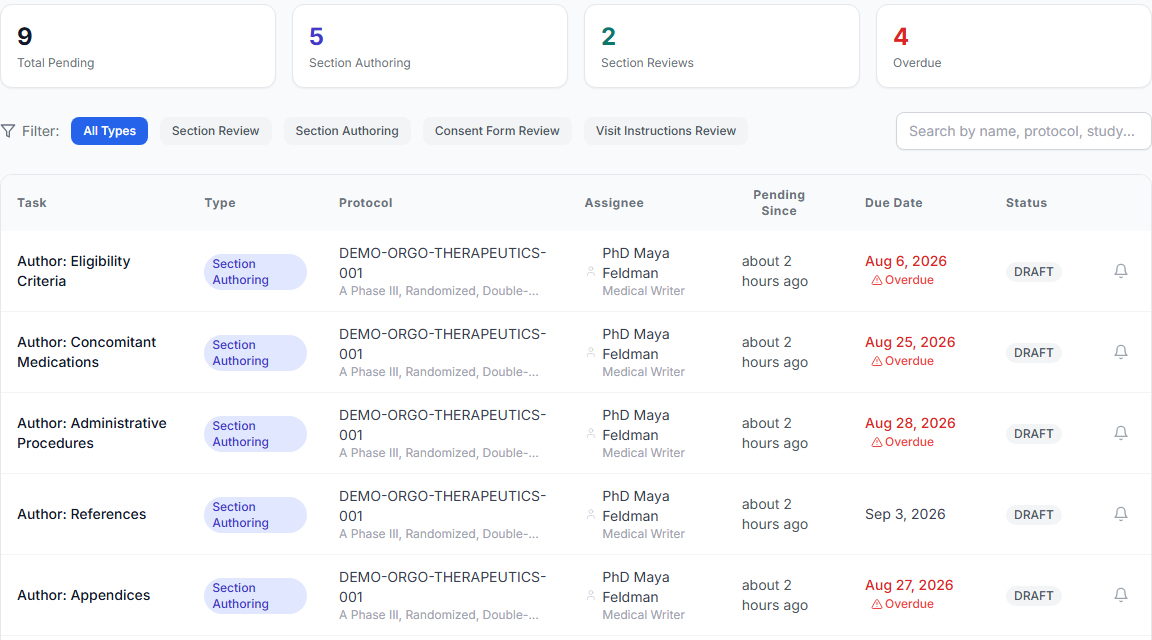
Clin ops leads run protocol development as a project, and Trelice gives them the project tooling: sections carry named writers and due dates, the pending-tasks page shows everything outstanding across every protocol with a reminder button beside each row, and the progress page shows completion, at-risk work, and unassigned sections per protocol. Sites and IRBs are managed on the study itself, and when an amendment lands, per-site notification tracking shows exactly which site has acknowledged the new version (see working with studies and amendments).
Medical science
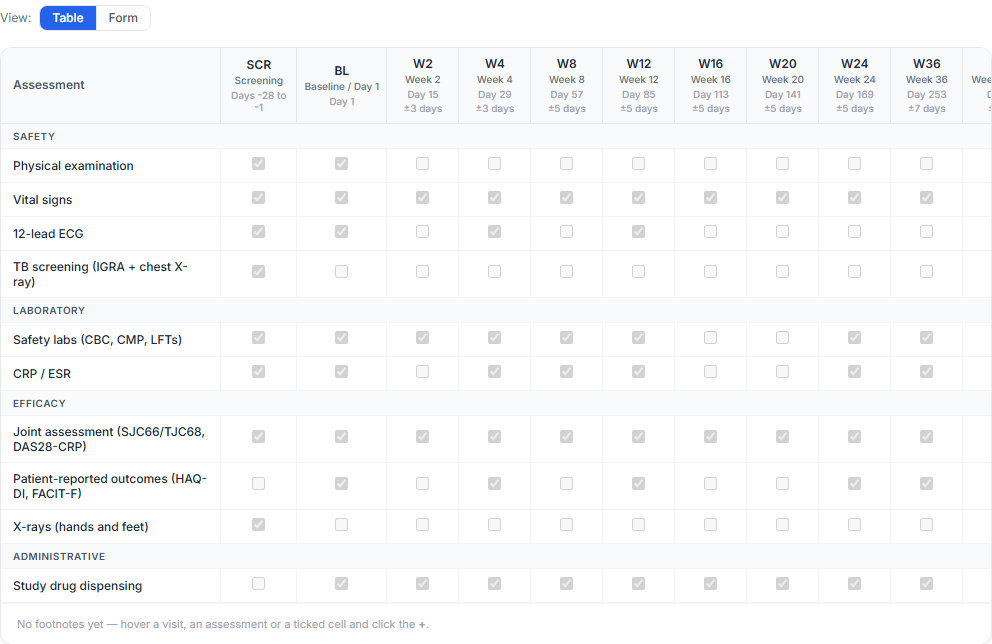
Medical and scientific leads spend their time in the Schedule of Assessments, and in Trelice it is a builder rather than a table wrestled in Word: visits with timing and windows, assessments grouped by category with special instructions and mandatory flags, and footnotes that number and renumber themselves as the schedule moves (see filling in structured sections).
The schedule then earns its keep. Visit instructions, the study schematic, and the site budget are generated from it automatically, and a change to it raises consistency alerts in every section that depends on it (see golden threads).
Biostatisticians
Statisticians get dedicated sections rather than a share of a Word file: statistical considerations, sample size, objectives and endpoints, each a structured form that a protocol template can reserve for the Biostatistician role. Two of the five consistency threads watch their work specifically (objectives, endpoints and statistical analysis, and sample size assumptions), so when an endpoint moves, the statistics sections are flagged for a look instead of quietly drifting (see roles and permissions).
Leadership
Leadership sets the review process once and then watches it run. Review workflows mirror your SOPs, with levels reviewed in order, an organization-wide default, and per-section overrides where a special section needs a different path (see setting up review workflows).
Every task list is personal. Reviewers see only the sections waiting on them in the approval queue, writers find their assignments in pending tasks, and the dashboard keeps the portfolio view. Overdue work is never invisible, because past-due notices go to the person responsible and to administrators (see notifications), and the audit trail and audit reports answer who approved what, and when.
Discussion where the work is
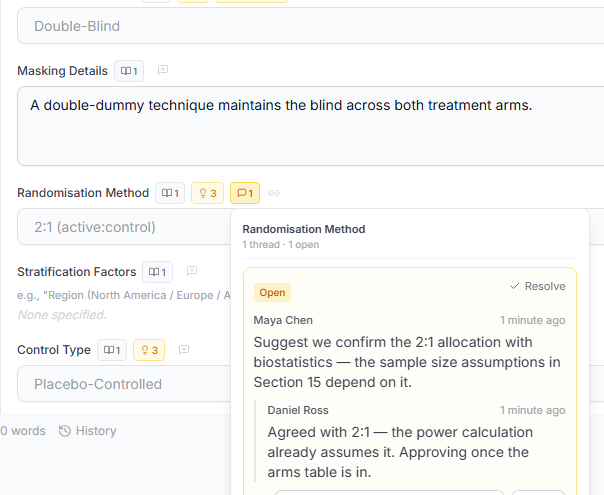
Every field in a protocol section can carry its own comment thread, anchored to the field so context never gets lost (see comments and working together). Threads are opened, replied to, resolved, and reopened in place, and a per-section discussion view gathers them with unresolved items first.
Instead of writing "in Study Design, under Overview, the third box down", colleagues share a link to the exact field; opening it lands them there, highlighted. When two people have the same section open, a banner names the other editor, saves warn before overwriting, and every version is kept in history, so nothing is lost to a save race (see the protocol editor).
Project management, built into the protocol
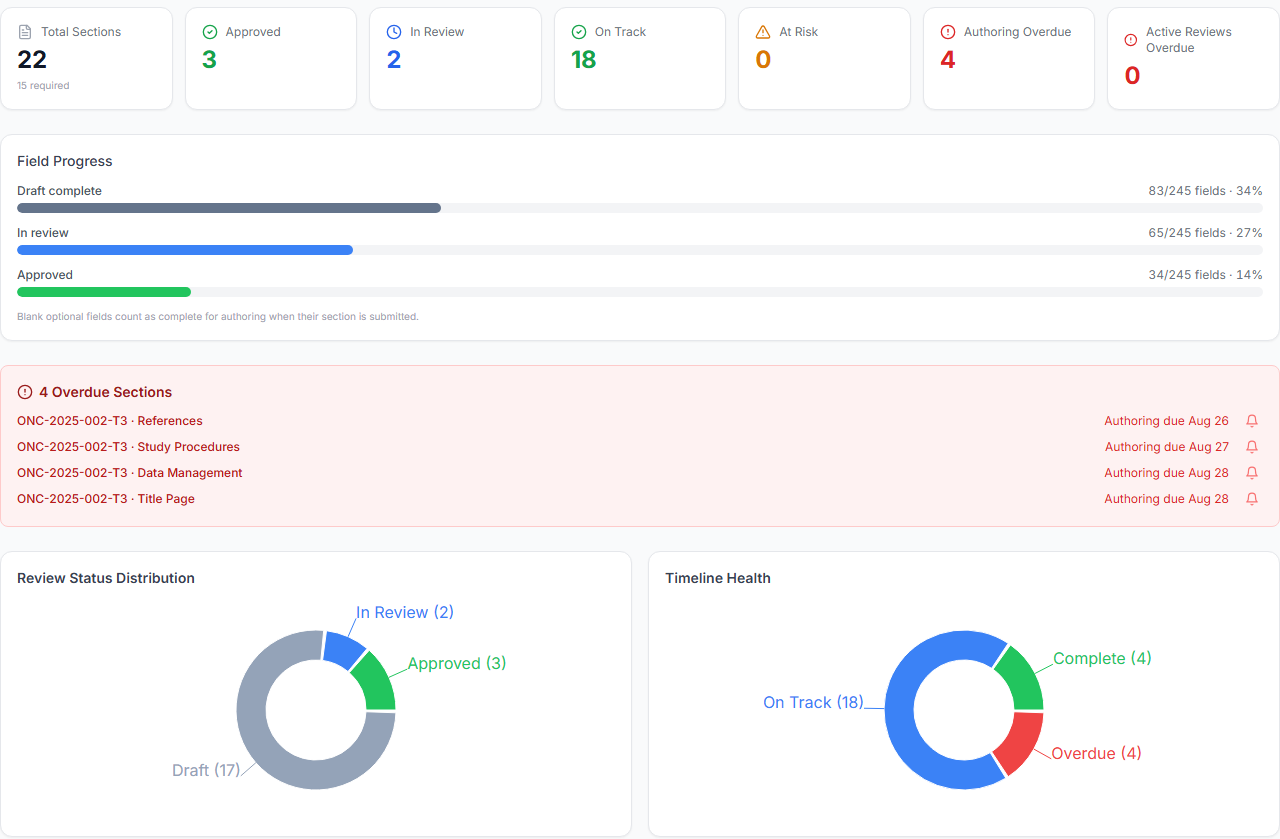
Protocol development is a project, and Trelice treats it like one. Sections are assigned to named writers with authoring due dates and review due dates; ownership is visible in the section list, and overdue work turns red (see sending a section for review).
The pending-tasks page lists everything outstanding across every protocol, filterable and sortable, with a per-protocol breakdown and a reminder button that sends a notification instead of another chasing email. Due-date reminders also go out automatically: ahead of the deadline, again shortly before it, and an overdue notice that administrators see too (see notifications and reminders).
Each protocol has a progress page with section-by-section status, an overall completion bar, at-risk and overdue alerts, and a list of sections nobody has been assigned yet (see progress and audit reports). The dashboard answers the wider question: what is happening across all our trials right now.
Review that matches your SOPs
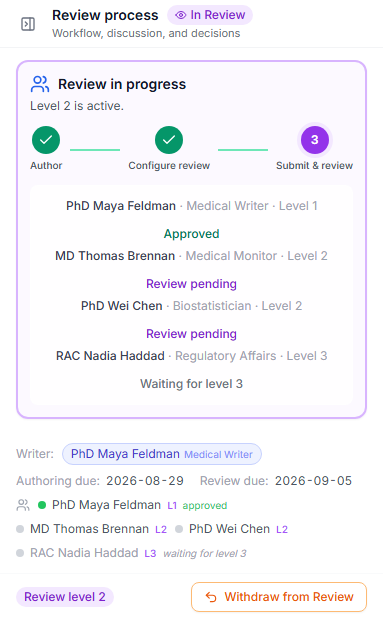
Review in Trelice follows workflows your administrators define: levels of reviewers, in order, with each level notified only when the previous one approves (see setting up review workflows). Reviewers are picked role first, then person, and a submission is refused until every required role is staffed.
Each reviewer works from a personal approval queue. Approvals are recorded as electronic signatures, change requests carry written feedback back to the writer (see reviewing and approving), and every step lands in the permanent audit trail. If a consistency alert is open on a section, the reviewer must acknowledge the check before approving, and the acknowledgment is recorded by name and date.
Multi-study work
Trelice is built for organizations running more than one trial. Studies are the top-level container, each with its status from concept through completed, its sites and IRBs, and its protocols; the studies list is searchable, filterable, and sortable (see working with studies).
Protocol templates carry your organization’s standards across studies: section order, per-section writer roles, required reviewer roles, and author instructions, so protocol three starts as disciplined as protocol one. Organization-wide libraries do the same for the details: one abbreviation list, one redaction policy, one procedure pricing table, applied everywhere (see abbreviations, redaction, and budget pricing).
Cross-study visibility comes from the dashboard counts (active studies, in development, pending review, completed) and the pending-tasks page’s per-protocol chips, which show at a glance which study is stuck.
Distributed teams, sponsors, CROs, and sites
Fourteen roles govern who can see and do what, from platform administrator to read-only viewer, with rank rules for who may grant which role (see roles and permissions). Sponsors bring CRO writers, investigators, and reviewers into the same protocol under the right permissions (see managing users and invitations), and translated consent content is reviewed only by language specialists qualified for that language (see translations and country versions).
Amendments keep distributed sites coordinated: per-site notification status moves from pending to notified to acknowledged, and country submissions are recorded by type, so nobody wonders which site has seen the new version (see creating and editing an amendment).
Everything runs in the browser. There is nothing to install, and notification preferences are per person and per type, in-app, email, both, or neither (see notifications).
The details that hold a document together
Collaboration fails on small things as often as big ones, so Trelice automates the small things. Abbreviations are inserted from your organization’s library or the standard ICH/GCP set; the first mention in the exported document expands automatically, the Abbreviations and Definitions section builds itself from what the protocol actually uses, and defined-but-unused entries are flagged before they clutter the list (see writing and formatting text).
Schedule of Assessments footnotes are numbered and placed by the system, renumbered automatically when visits or rows move, and reusable across the table, with the numbering style set once for the whole organization (see filling in structured sections).
Amendments produce a generated summary of changes, with the written reason for every changed field, downloadable as PDF or Word (see amendment history and versions). Nobody reconstructs what changed from memory the night before a submission.